Player Stats Interface Animation
Game Trailer Anime 2026-08-08
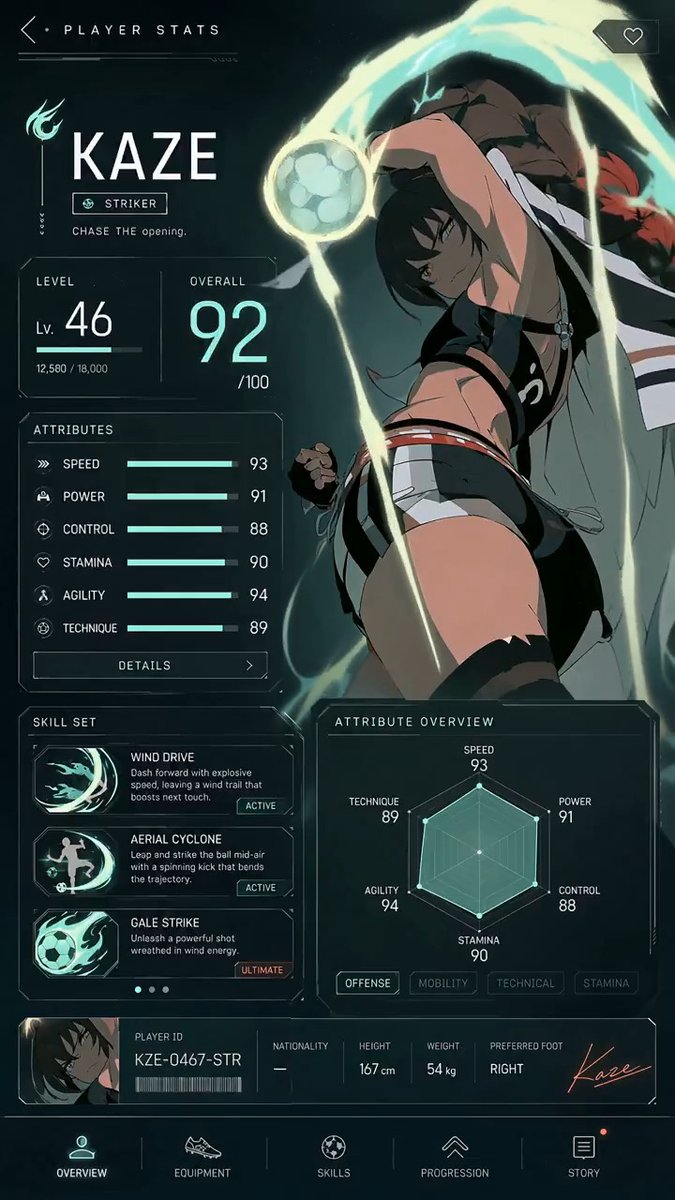
Footage © @aimikoda · View original post
The clip was published publicly by its creator and is linked here directly; rights holders may request removal.
Full prompt
Player stats UI animation with GPT Image 2 and MiniMax H3.

This model is amazing for UI animations. Give GPT Image 2 your character image and ask it to create a stats UI. Then use that UI as a reference for MiniMax H3.

You can check the prompt in the replies. https://t.co/0qcCQTQcro

### 作者补充

[补充1]
Player stats UI animation with GPT Image 2 and MiniMax H3.

This model is amazing for UI animations. Give GPT Image 2 your character image and ask it to create a stats UI. Then use that UI as a reference for MiniMax H3.

You can check the prompt in the replies. https://t.co/0qcCQTQcro

[补充2]
MiniMax H3 Prompt:

@[ref img] is the sole visual authority for Kaze, the football, the complete player-stats interface, typography, numbers, icons, colors, lighting, layout, and vertical composition. Animate this exact screen without redesigning it. Preserve all existing labels and final stat values.
[Goal]
Create a polished 15-second anime sports-game player stats screen opening. Use one continuous, locked, straight-on full-screen composition with no camera movement, cuts, cropping, or perspective distortion.

[Sequence]
0–2.2 seconds: Begin from near-black teal. A faint horizontal scanner passes downward, revealing Kaze’s silhouette and the outer edges of the interface. Fine particles and dim mint circuitry flicker awake.
2.2–5.5 seconds: The header, KAZE nameplate, role badge, level panel, and overall panel resolve through clean line-draw animations. Kaze emerges fully from shadow, takes a controlled breath, subtly shifts her shoulders and raised arm into the referenced pose, then fixes an intense gaze toward the viewer. Her hair, ribbons, and loose clothing react naturally to a growing current of wind. The football begins a slow, stable rotation beside her hand.

5.5–10.8 seconds: The large overall score counts rapidly upward and lands precisely on 92. The level settles on 46. Each attribute bar fills smoothly from left to right in sequence—Speed 93, Power 91, Control 88, Stamina 90, Agility 94, Technique 89—each landing with a restrained mint pulse. The radar chart draws outward from its center and locks into the exact final polygon. Skill cards activate from top to bottom; their icons flare briefly while the ACTIVE and ULTIMATE states illuminate.
10.8–13.3 seconds: The player ID strip and bottom navigation fade and slide into their exact final positions. The wind energy around Kaze accelerates clockwise, wrapping around the rotating ball and sweeping behind her body with layered luminous trails. Kaze tightens her hand, leans slightly into the current, and gives one natural blink; preserve her identity, anatomy, costume, and right-side placement.

13.3–15 seconds: The energy arc reaches a bright controlled crest, then settles into a living idle pulse. Hold the fully assembled screen matching @[ref img] exactly. Kaze continues subtle breathing; hair and ribbons drift, the football rotates slowly, particles shimmer, and all stats remain stable and readable.

Use crisp premium game-UI motion, clean 2D anime character animation, subtle depth between Kaze and the interface, and stable legible typography. Keep every panel, icon, label, number, and geometric boundary fixed once revealed. Do not introduce new text, extra characters, additional objects, logos, captions, or UI elements.

Audio: low electronic boot hum, delicate scanning ticks, short confirmation tones as values lock, rising airy wind around the ball, soft cloth movement, and one refined completion chime. No dialogue and no music.
Details
| Target model | MiniMax H3 |
|---|---|
| Use case | Game Trailer |
| Style | Anime |
| Media | Video |
| Duration | 15.1s |
| Aspect ratio | 9:16 |
| Likes | 704 |
| Published | 2026-08-08 |
Attribution
Author: @aimikoda · View original post
Prompts remain the copyright of their authors. We index and quote them with attribution plus a link to the original post; rights holders may request removal.
Run this prompt through the API
Copy the prompt above into a MiniMax H3 (Hailuo) text-to-video call to reproduce the shot. When adapting it, swap subject, setting and camera move one clause at a time. Access and licensing details are on About.