Footwear E-commerce Dynamic Page
Brand / Product Ad Other 2026-08-27
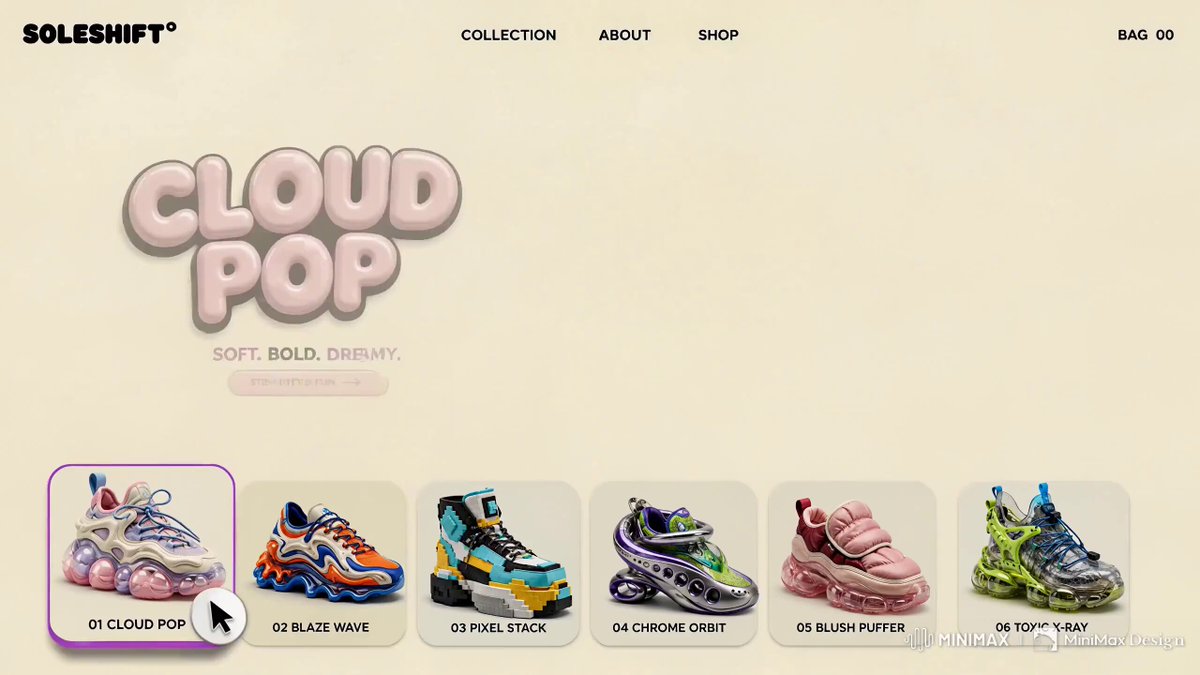
Footage © @ShamsAmin56 · View original post
The clip was published publicly by its creator and is linked here directly; rights holders may request removal.
Full prompt
Hailuo MiniMax Design @Hailuo_AI @MiniMax_AI

Another Prototype
Another Test - PASSED

SOLESHIFT°
A playful footwear e-commerce concept where every cursor hover transforms the shoe, typography, colors and motion graphics.

No single text error or inaccuracy throughout all the video.

The model passed the followings successfully

- Animated Shape Layers
- Kinetic Typography
- Cursor Hover Update
- Bounce Effects
- Wiggle Effects
- Live Background
- Micro Text Renders
- Ease in Ease out Keyframes

Tip: Use Visual Hierarchy - One of the most essential core design principle.

Prompt & Workflow below

### 作者补充

[补充1]
Hailuo MiniMax Design @Hailuo_AI @MiniMax_AI

Another Prototype
Another Test - PASSED

SOLESHIFT°
A playful footwear e-commerce concept where every cursor hover transforms the shoe, typography, colors and motion graphics.

No single text error or inaccuracy throughout all the video.

The model passed the followings successfully

- Animated Shape Layers
- Kinetic Typography
- Cursor Hover Update
- Bounce Effects
- Wiggle Effects
- Live Background
- Micro Text Renders
- Ease in Ease out Keyframes

Tip: Use Visual Hierarchy - One of the most essential core design principle.

Prompt & Workflow below

[补充2]
Hailuo @MiniMax_AI @Hailuo_AI H3

A prototype motion-graphics landing page for ice cream, built to test just how far H3 can push UI animation, typography, transitions, hover interactions, and product motion.

I tried creating similar effects manually in Adobe After Effects but https://t.co/F3vGqZHsAP

[补充3]
Create a premium 15-second 16:9 animated footwear e-commerce landing page using @[UI Sample.png] as the strict visual reference for layout, typography, product placement, graphic style, colors, cursor interaction and overall art direction. Use all six uploaded standalone shoe images as the exact product references. Preserve each shoe’s silhouette, construction, materials, colors, laces and sole geometry. Never redesign, merge or recolor the products.

PRODUCT REFERENCES

Use these exact names and corresponding images:

01 CLOUD POP — @[CLOUD POP.png]Pastel cream, pink and lavender sneaker with blue laces and translucent bubble sole.

02 BLAZE WAVE —@[BLAZE WAVE.png] Orange, royal-blue and cream sneaker with fluid sculptural wave sole.

03 PIXEL STACK — @[PIXEL STACK.png]Black, cyan, white and yellow pixel/block high-top sneaker.

04 CHROME ORBIT — @[ORBIT CHROME.png]Metallic silver futuristic shoe with purple orbital structures, lime mesh and turquoise details.

05 BLUSH PUFFER —@[BLUSH PUFFER.png]Pink and burgundy padded sneaker with oversized quilted upper and transparent pink sole.

06 TOXIC X-RAY —@[TOXIC -X RAY.png] Transparent sneaker with toxic-lime structural cage, electric-blue laces and translucent lime sole.

Never interchange products or names.

WEBSITE UI

Closely follow UI Sample(1) with a playful professional Y2K × futuristic footwear × editorial e-commerce aesthetic.

Warm cream/off-white base with colorful product-specific graphics.

Top-left:

SOLESHIFT°

Navigation:

COLLECTION ABOUT SHOP

Top-right:

BAG 00

Large dynamic headline on the left, hero shoe center/right, CTA underneath and six rounded product cards across the bottom:

01 CLOUD POP02 BLAZE WAVE03 PIXEL STACK04 CHROME ORBIT05 BLUSH PUFFER06 TOXIC X-RAY

All typography must remain sharp, stable and perfectly spelled.

INTERACTION

Show a clearly visible white mouse cursor with subtle dark outline.

The cursor must hover over every product in exact order:

01 → 02 → 03 → 04 → 05 → 06

Every interaction must clearly read:

cursor hover → card reacts → matching hero appears → headline changes → background transforms → cursor continues.

Hovered cards rise slightly, scale to approximately 104%, receive a colored outline/shadow and bounce.

Hero shoes occupy approximately 65–70% of the main hero area.

0:00–0:02 — CLOUD POP

Cursor hovers 01 CLOUD POP.

CLOUD POP becomes the large hero with a soft scale-up and elastic bounce.

Headline:

CLOUD POP

Subline:

SOFT. BOLD. DREAMY.

CTA:

STEP INTO FUN →

Background: cream, pastel pink and lavender with glossy bubbles, organic blobs, stars, dots and subtle halftone textures.

0:02–0:04 — BLAZE WAVE

Cursor slides to 02 BLAZE WAVE.

CLOUD POP exits through a fast graphic wipe. BLAZE WAVE springs into the hero area.

Headline:

BLAZE WAVE

Subline:

FAST. FLUID. LOUD.

Transform the environment into cream, vivid orange and electric blue. Add flowing 2D waves, liquid ribbons, warped checkerboards, curved speed lines and bouncing circles inspired by the shoe’s sculptural sole.

0:04–0:06 — PIXEL STACK

Cursor moves to 03 PIXEL STACK.

BLAZE WAVE breaks into rectangular graphic wipes while PIXEL STACK assembles through a rapid pixel-block transition.

Headline:

PIXEL STACK

Subline:

BLOCK. BUILD. BREAK.

Background: cream, cyan, yellow, black and white with pixel squares, stepped grids, modular blocks and checker patterns.

Keep everything premium rather than videogame-like.

0:06–0:08 — CHROME ORBIT

Cursor hovers 04 CHROME ORBIT.

PIXEL STACK collapses through blocks and CHROME ORBIT sweeps into position along a curved orbital path.

Headline:

CHROME ORBIT

Subline:

METAL. MOTION. FUTURE.

Palette becomes metallic silver, purple, acid lime and turquoise. Add orbital rings, chrome spheres, circular outlines and looping paths.

Use subtle floating motion without deforming the shoe.

0:08–0:10 — BLUSH PUFFER

Cursor moves to 05 BLUSH PUFFER.

CHROME ORBIT disappears through a circular wipe. BLUSH PUFFER pops
Details
| Target model | MiniMax H3 |
|---|---|
| Use case | Brand / Product Ad |
| Style | Other |
| Media | Video |
| Duration | 15.1s |
| Aspect ratio | 16:9 |
| Likes | 289 |
| Published | 2026-08-27 |
Attribution
Author: @ShamsAmin56 · View original post
Prompts remain the copyright of their authors. We index and quote them with attribution plus a link to the original post; rights holders may request removal.
Run this prompt through the API
Copy the prompt above into a MiniMax H3 (Hailuo) text-to-video call to reproduce the shot. When adapting it, swap subject, setting and camera move one clause at a time. Access and licensing details are on About.