AI Video Model Review
Other Other 2026-08-31
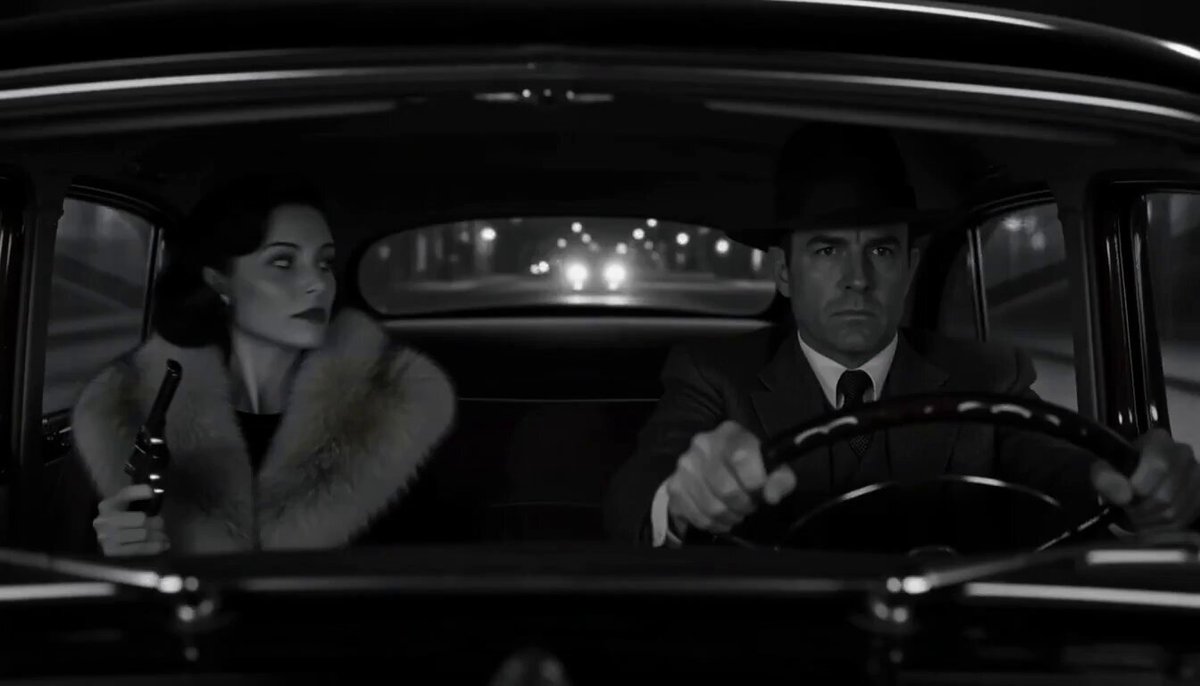
Footage © @eattheethos · View original post
The clip was published publicly by its creator and is linked here directly; rights holders may request removal.
Full prompt
Tested Minimax H3 max all weekend. You can use it in Preview now - its cheap and fast.

Best prompt format is in the comments 👇

Here's what you need to know:

- H3 feels like a draft model, it brings a new way to conceptualize and brainstorm shots, characters, locations through video instead of images

- Don't expect to get great quality from t2v especially if there's a lot of action or motion in the shot.

- JSON prompting works best. I'm not kidding. Normal text works well too, but json seems more consistent in its adherence.

- The quality is only as good as your start and end frames.

- You can pack a lot into a little, but the more that's happening the worse the quality becomes.

- Wide shots struggle with character consistency.

- The emotion and voice acting from characters is impressive.

This model really shines on simple things like creating character turnarounds, or a near static frames from a strong reference - see what I mean below.

### 作者补充

[补充1]
Tested Minimax H3 max all weekend. You can use it in Preview now - its cheap and fast.

Best prompt format is in the comments 👇

Here's what you need to know:

- H3 feels like a draft model, it brings a new way to conceptualize and brainstorm shots, characters, locations through video instead of images

- Don't expect to get great quality from t2v especially if there's a lot of action or motion in the shot.

- JSON prompting works best. I'm not kidding. Normal text works well too, but json seems more consistent in its adherence.

- The quality is only as good as your start and end frames.

- You can pack a lot into a little, but the more that's happening the worse the quality becomes.

- Wide shots struggle with character consistency.

- The emotion and voice acting from characters is impressive.

This model really shines on simple things like creating character turnarounds, or a near static frames from a strong reference - see what I mean below.

[补充2]
This is an image from midjourney used as a start frame, and with it I'm able to create a reliable character turnaround reference.

Make a video like this, then tell Preview agent to grab a still frame of each angle, then stitch them back into one image, now you've got an easy high quality character sheet.

Or if you're using a model like seedance 2.5 you could use this video as your character reference.

Prompt below...

[补充3]
JSON PROMPT TEMPLATE

For a single continuous shot, omit the "timeline" array entirely and describe the action in "scene.action". For multiple beats or cuts, use "timeline" and leave "scene.action" as a brief overview. Keep every key present; use "none" or an empty array rather than deleting a key.

{
  "visual_direction_only": true,
  "narration_instruction": "Visual direction only, no narration read aloud.",
  "look": {
    "medium": "[format, film stock/grade word, era]",
    "presentation": "[how/where this is viewed or framed, or 'direct']",
    "lighting_quality": "[quality/color/hardness of light]"
  },
  "camera": {
    "shot_type": "[close-up, wide, medium, etc]",
    "movement": "[static, push-in, handheld, pan, etc]",
    "movement_change": "[if movement shifts mid-shot, describe when/how, or 'none']"
  },
  "scene": {
    "overview": "[who is in frame, setting, what is happening overall]",
    "action": "[direct action description for a single continuous shot; brief overview if using timeline instead]"
  },
  "timeline": [
    {
      "timecode": "[0-Xs]",
      "camera": "[shot/movement for this beat]",
      "action": "[what happens in this beat]",
      "dialogue": "[line spoken in this beat, or 'none']"
    },
    {
      "timecode": "[X-Ys]",
      "camera": "[shot/movement for this beat]",
      "action": "[what happens in this beat]",
      "dialogue": "[line spoken in this beat, or 'none']"
    }
  ],
  "performance": {
    "pacing": "[slow/fast, deliberate/urgent, or 'none']",
    "breathing": "[timing/rhythm/breath notes, or 'none']",
    "physical_beats": ["[beat one]", "[beat two]"]
  },
  "dialogue": [
    {
      "speaker": "[name/description]",
      "delivery": "[tone, pace, pauses]",
      "lines": "[exact dialogue text, with [pause] markers as needed]"
    }
  ],
  "audio": {
    "ambience": "[environmental/room tone, or 'none']",
    "sound_effects": "[specific diegetic effects and timing, or 'none']",
    "music": "[style/mood/instrumentation, or 'none']",
    "constraint": "The only audio in this video is the dialogue above exactly as written, plus the ambience/sound_effects/music explicitly listed above.",
    "excluded": ["narration", "voiceover reading this description", "any audio not listed above"]
  },
  "exclusions": ["[unwanted visual or audio element]", "[unwanted visual or audio element]"]
}

[补充4]
PLAIN TEXT PROMPT TEMPLATE

Use for anything beyond a static one-shot talking-head: camera movement, style/era anchoring, multiple speakers, sound design decisions, or a sequence of beats/cuts. Keep every heading even when a category is unused — write "none" rather than omitting it, so the model treats it as a decision, not a gap. For a single continuous shot, skip the Timeline section and describe action directly under Scene. For multiple beats or cuts, use the Timeline section and leave Scene as a one-line overview.

Visual direction only, no narration read aloud.

Look: [medium/format, film stock or grade word, era, quality of light]. Presentation: [how/where this is being viewed or framed, e.g. projected in a theater, straight-to-camera, security footage, or "direct" if none].

Camera: [shot type/framing]. Movement: [static / push-in / handheld / pan / etc]. Movement change: [if the camera's movement shifts partway through, describe when and how, or "none"].

Scene: [one-line overview of who is in frame, the setting, and what is happening overall].

Timeline (only for multi-beat or multi-shot prompts — omit this section entirely for a single continuous shot):
[Beat 1, 0–Xs]: Camera: [shot/movement for this beat]. Action: [what happens]. Dialogue: [line spoken in this beat, or "none"].
[Beat 2, X–Ys]: Camera: [shot/movement for this beat]. Action: [what happens]. Dialogue: [line spoken in this beat, or "none"].
[Continue one beat per line, each with its own timecode, camera, action, and dialogue-or-none.]
Performance: Pacing: [slow/fast, deliberate/urgent]. Breathing: [timing/rhythm/breath notes, or "none"]. Physical beats: [ordered list of gestures/expression changes, or reference the Timeline above if already covered there].
Dialogue (list one entry per speaker; for a single speaker just use one):
Speaker: [name/description]. Delivery: [tone, pace, pauses]. Lines: "[exact dialogue text, with [pause] markers as needed]"
Speaker: [name/description]. Delivery: [tone, pace, pauses]. Lines: "[exact dialogue text]"
Audio — ambience: [environmental/room tone description, or "none"].
Audio — sound effects: [specific diegetic effects and when they happen, or "none"].
Audio — music: [style/mood/instrumentation if present, or "none"].
Audio constraint: The only audio in this video is the dialogue above exactly as written, plus the ambience/sound effects/music explicitly listed above. Do not generate narration, a voiceover reading this description, or any audio not listed here.

Exclusions: [explicit list of anything unwanted, visual or audio — e.g. no text on screen, no modern objects, no extra people, no score, no narration].
Details
| Target model | MiniMax H3 |
|---|---|
| Use case | Other |
| Style | Other |
| Media | Video |
| Duration | 15.2s |
| Aspect ratio | 7:4 |
| Likes | 8 |
| Published | 2026-08-31 |
Attribution
Author: @eattheethos · View original post
Prompts remain the copyright of their authors. We index and quote them with attribution plus a link to the original post; rights holders may request removal.
Run this prompt through the API
Copy the prompt above into a MiniMax H3 (Hailuo) text-to-video call to reproduce the shot. When adapting it, swap subject, setting and camera move one clause at a time. Access and licensing details are on About.