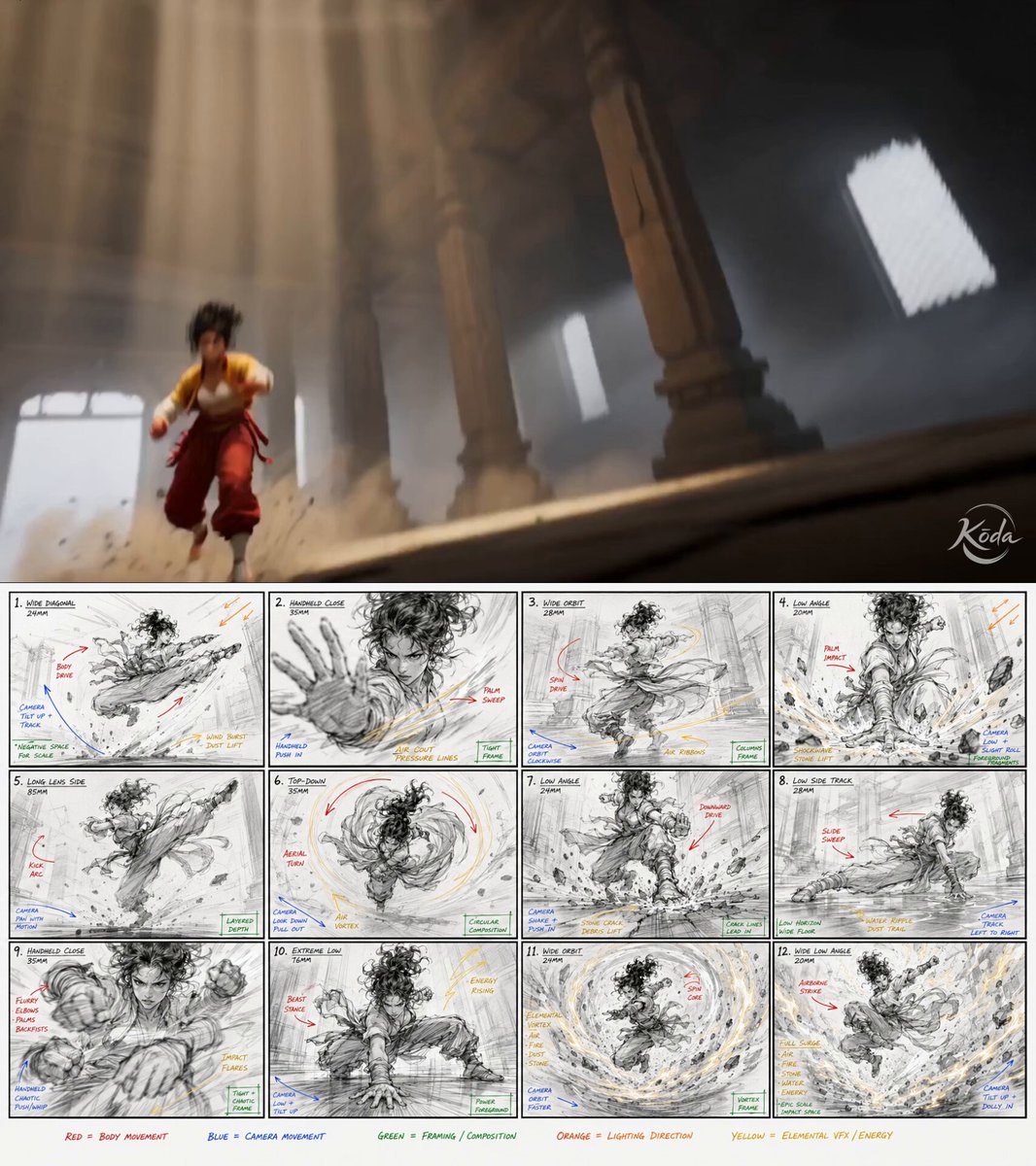
In one sentence: This breaks down a two-stage workflow — first use an image model to draw a 12-panel storyboard, then feed that storyboard to a video model as a hard constraint — with both prompts included in full; suited for people who can already write single-shot video prompts but struggle with long takes drifting off-action or losing beat control.
Field Table
| Field | Value |
|---|---|
| model | Stage 1 GPT Image 2 (generates storyboard), Stage 2 Seedance 2.0 (generates video); based on the author’s original post first line “GPT Image 2 + Seedance 2.0 Prompt Share” |
| duration | 16.0 seconds (prompt states 15 seconds, final output is 16.0 seconds) |
| aspect | Final output vertical 853:960; storyboard itself is 16:9 horizontal (see stage 1 prompt) |
| seed and reproducibility | Not recorded; unverified — author has published the final video, this library has not re-run it |
| final video link | Embedded preview on page, see card above and original post |
| estimated cost | To be estimated (per official pricing, use cost calculator) |
| author and original link | @aimikoda · https://x.com/aimikoda/status/2054460932068200517 |
prompt_en
Original reproduction (attribution + original link complete, see field table). The following three sections are, in order, the author’s main text, comment addition 1 (storyboard prompt), addition 2 (video prompt), and addition 3 (author’s note on color coding), all from the same author’s same tweet thread:
GPT Image 2 + Seedance 2.0 Prompt Share
Mei Lin’s Elemental Kung Fu Performance
Created on @mitte_ai
I’m experimenting with Laban right now. I think it helps make movements feel smoother and more expressive, but I still need to do more tests. For this one, I only added a small Laban section to the Seedance prompt.
Laban is a movement analysis system that describes motion through weight, time, space and flow.
GPT Image 2 Prompt for Storyboard:

Create a raw kung fu performance storyboard focused on extreme physical action. Use reference image for the character.

16:9 storyboard sheet, 12 cinematic panels. The actual storyboard drawings must be black and white only: rough pencil lines, minimal detail, fast gesture drawing energy, simple anatomy construction and strong silhouette readability. Keep the art loose and sketchy, like a real pre-production board.

Annotations must be color-coded so the model can separate instruction types: body movement in blue, camera movement in red, framing in green, lighting in orange. Keep annotation text short and legible.

The 12 panels must show a continuous kung fu performance with escalating intensity: stance, approach, first strike, block, counter, spin kick, ground work, recovery, aerial move, impact, final pose, settle.
Seedance 2.0 Prompt:
Create a 15-second cinematic kung fu performance video.
Use @[image1] as the fixed character sheet reference. The character must strictly match the character sheet. Use @[image2] as the storyboard reference.
Follow the storyboard shot by shot as the main source for action order, camera rhythm, body movement, framing, movement direction, camera angles and visual progression. Do not reinterpret the actions, poses, camera angles or emotional progression.
Compress the full 12-beat sequence into 15 seconds with smooth continuous motion between beats.
Laban movement qualities: strong weight in strikes, sudden time in impacts, direct space in advances, bound flow in blocks and free flow in recovery.I also ended up color-coding the storyboard annotations because otherwise annotations were confusing the model. Different colors helped separate body movement, camera motion, framing and lighting directions from the actual environment and character drawings.prompt_zh
Self-translated by this library, a variant, not generation-tested, marked unverified:
GPT Image 2 + Seedance 2.0 prompt share

Mei Lin's elemental kung fu performance

Made on @mitte_ai

I'm currently experimenting with Laban. I think it makes movements smoother and more expressive, but I still need more testing. In this one, I only added a small Laban section to the Seedance prompt.

Laban is a movement analysis system that describes motion through weight, time, space, and flow.
GPT Image 2 storyboard prompt:
Create a raw kung fu performance storyboard focused on extreme physical action. Use the reference image for the character.
16:9 storyboard layout, 12 cinematic panels. The storyboard drawings themselves must be black and white only: rough pencil lines, minimal detail, fast gesture drawing energy, simple anatomy construction, and strong silhouette readability. Keep the art loose and sketchy, like a real pre-production board.
Annotations must be color-coded so the model can distinguish instruction types: body movement in blue, camera movement in red, framing in green, lighting in orange. Keep annotation text short and legible.
These 12 panels must show a continuous kung fu performance with escalating intensity: stance, approach, first strike, block, counter, spin kick, ground work, recovery, aerial move, impact, final pose, settle.Seedance 2.0 prompt:
Create a 15-second cinematic kung fu performance video.
Use @[image1] as the fixed character sheet reference. The character must strictly match the character sheet. Use @[image2] as the storyboard reference.
Follow the storyboard shot by shot as the main source for action order, camera rhythm, body movement, framing, movement direction, camera angles, and visual progression. Do not reinterpret these actions, poses, camera angles, or emotional progression.
Compress the full 12-beat sequence into 15 seconds, keeping smooth continuous motion between beats.
Laban movement qualities: strong weight in strikes, sudden time in impacts, direct space in advances, bound flow in blocks, free flow in recovery.Breakdown
The 5 things it gets right
One: outsourcing narrative structure to the image model instead of cramming it into the video prompt. Information like “12 action beats with escalating intensity” becomes a long list of parallel phrases if written directly into a video prompt, and the model struggles to allocate time and order. The author’s approach is to first have GPT Image 2 solidify it into an image: The 12 panels must show a continuous kung fu performance with escalating intensity: stance, approach, first strike, block, counter, spin kick, ground work, recovery, aerial move, impact, final pose, settle. — 12 beats are each named and each assigned a panel; order shifts from text to spatial position. From then on, the video model reads not “a description” but “an already sequenced image.” This is the core mechanism of the entry: structure is first rendered into pixels, then handed downstream.
Two: color coding, visually separating “instructions” from “image content.” Annotations must be color-coded so the model can separate instruction types: body movement in blue, camera movement in red, framing in green, lighting in orange. The author states it plainly in addition 3: without color coding, annotations confuse the model. The reason is easy to understand — a storyboard image contains both “things to draw” and “notes about how to shoot,” and the model has no prior knowledge to distinguish them. Color is the lowest-cost classification signal. This lesson extends beyond this case: any intermediate image meant to be read by a model should give metadata its own dedicated channel.
Three: the storyboard’s art style constraints themselves serve machine readability. black and white only: rough pencil lines, minimal detail, fast gesture drawing energy, simple anatomy construction and strong silhouette readability — note these constraints are not aesthetic preferences: black and white lets the color annotations pop (echoing point two); minimal detail and strong silhouette readability ensure each panel conveys only pose information without carrying texture details that downstream might mistake for style instructions. The author isn’t after a good-looking storyboard — it’s a high signal-to-noise storyboard.
Four: the second stage uses prohibitive wording to upgrade the reference image from “reference” to “hard constraint.” Follow the storyboard shot by shot as the main source for action order, camera rhythm, body movement, framing, movement direction, camera angles and visual progression. First it positively lists the authoritative source for each of seven items, then closes the door with Do not reinterpret the actions, poses, camera angles or emotional progression. The default semantics of “reference image” are vague — models easily take only the style and freely re-choreograph the action; these two sentences say “this image is a script, not inspiration.” The same line in the same prompt, The character must strictly match the character sheet., applies the same technique to the character.
Five: two reference images each bound to one job, explicitly named via @[image1] / @[image2]. The character sheet governs “what it looks like,” the storyboard governs “how it moves, how it’s shot.” Without naming, the model blends both into one vague visual reference; with naming, every constraint attaches to a definite image. This is basic practice in multi-image reference scenarios — many people provide two images but write only “reference these images,” which amounts to giving them away for free.
Where it could improve
One: aspect ratio breaks between the two stages; the second stage never picks it up. Stage 1 explicitly requires 16:9 storyboard sheet, while the final output is vertical (853:960). The stage 2 prompt contains no aspect ratio declaration — feeding horizontal storyboard panels into a vertical output means every panel’s composition must be recropped, and framing isn’t truly inherited. When writing your own: either have the storyboard panels match the target aspect ratio from stage 1 (vertical output means vertical panels), or at minimum explicitly declare the output aspect ratio in stage 2 so the model knows how to translate.
Two: 12 beats compressed into 15 seconds, but no beat is assigned a duration. Compress the full 12-beat sequence into 15 seconds hands the entire rhythm allocation to the model: an average of 1.25 seconds per beat, yet first strike and settle clearly shouldn’t be equal length. Since you’ve already paid the cost of making a storyboard, you might as well mark second ranges for key beats in the prompt (even just 3–4 major beats), turning rhythm into a controlled variable as well. Also, the prompt says 15 seconds and the output is 16.0 seconds, indicating duration itself isn’t strictly enforced — unverified as to the source of the discrepancy.
Three: the Laban section is a list of adjectives — neither controlled nor attributable. strong weight in strikes, sudden time in impacts, direct space in advances, bound flow in blocks and free flow in recovery introduces a vocabulary system for describing movement quality (weight / time / space / flow) — the direction is right: far more actionable than empty phrases like “make the action powerful.” But it isn’t bound to specific beat numbers; it blanket-covers the whole piece. More problematically, the storyboard is already strongly constraining the action in the same video, so even if the output’s movement quality is good, there’s no way to tell whether Laban or the storyboard did the work. The author himself says I still need to do more tests. To validate it, you’d need a controlled test changing only the Laban section while keeping everything else fixed.
Four (incidental): the pipeline is long — any stage failing means redoing the whole chain. Both prompts are extremely long, with a storyboard in between that must meet quality standards — if the storyboard comes out badly, even the most precise downstream constraints are amplifying errors. This workflow suits videos with complex action, many beats, and enough value to justify a one-time investment; it’s a loss for shooting a single 3–5 second action.
Further Reading
- Storyboard-level long prompts: organizing by timeline segments
- Character consistency locking patterns
- Camera movement instruction vocabulary v0 (bilingual)